


If you’re wondering, “Does Duolingo have Tagalog?” you’re definitely not alone.
Quick answer: No, Duolingo still doesn’t offer a Tagalog course.
But don’t worry—there are plenty of great apps that do teach Tagalog.
And in this blog post, I’ll explain what Tagalog is and also share the 5 best apps that can help you learn Tagalog (Filipino).
Let’s dive in!
What is Tagalog (Filipino)?
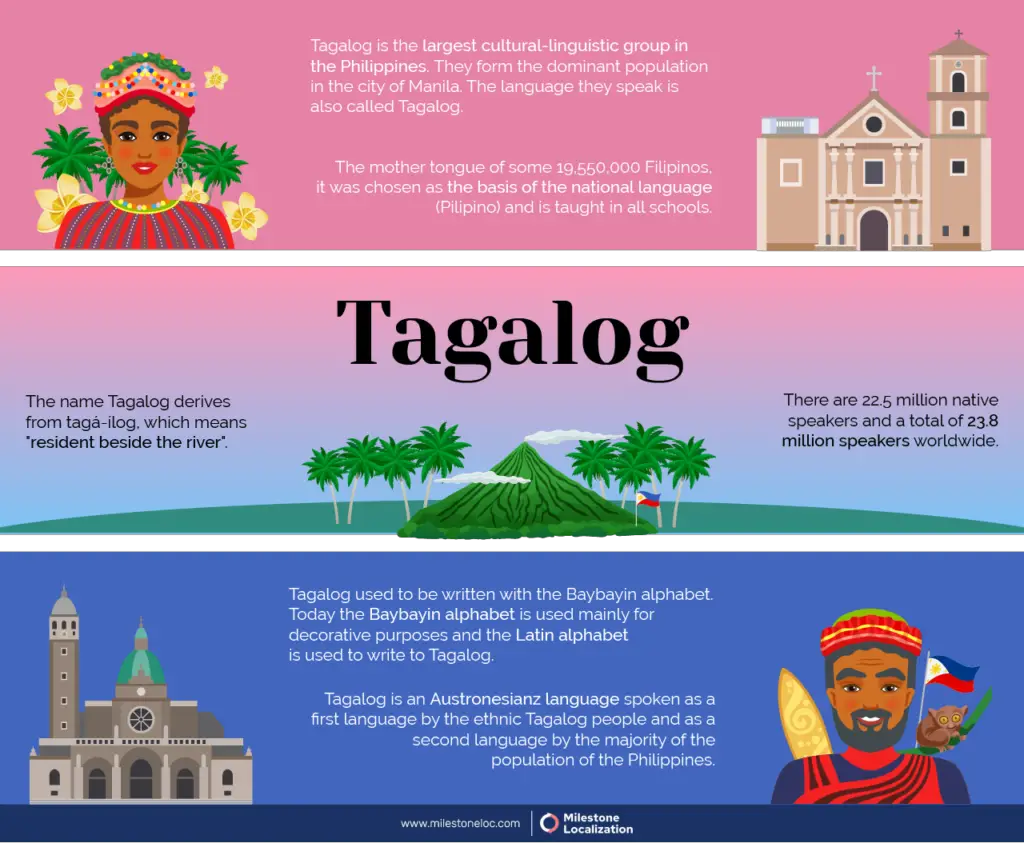
Tagalog is an Austronesian language mainly spoken in the Philippines. You might also hear it called Filipino, which is actually the official language of the country.
But Tagalog isn’t just spoken in the Philippines. Thanks to millions of Filipinos living abroad, you’ll also hear it in places like the United States, Canada, Australia, and even parts of the Middle East.
That’s why it’s one of the most in-demand languages on Duolingo — even though they still haven’t added it yet.
Does Duolingo Have Tagalog?
Nope—Duolingo doesn’t offer a Tagalog course right now. But who knows? Maybe they’ll add it in the future!
Best 5 Apps to Learn Tagalog (Filipino)
After trying out a lot of different apps, I finally found these 5 that can really help you learn Tagalog (Filipino).
1: FilipinoPod101

FilipinoPod101 is one of the most popular apps out there for learning Tagalog.
You get short audio and video lessons, word lists, slideshows, and tons of other helpful tools. You also get access to a dedicated Filipino instructor, which is a huge bonus if you want guidance while learning.
Also read: Is Duolingo Really Free?
They even upload free learning videos on YouTube, which is awesome if you’re on a budget.
Pros
- Personalized learning
- Access anywhere
- Dedicated Filipino instructor
- Free YouTube videos
Cons
- Only teaches Filipino (Tagalog)
- No completely free version
Pricing
| Subscription Plan | Price per Month |
|---|---|
| Basic | $4.00 |
| Premium | $10.00 |
| Premium PLUS | $23.00 |
2: Ling
Ling is another great app for learning Tagalog (Filipino).
Its simple interface makes it easy to use, and it comes with fun features like interactive lessons, mini games, and quick 10-minute sessions. These make it perfect for busy learners.
Pros
- Interactive lessons
- Mini-games
- Short lessons
- Supportive team
Cons
- Limited free access
Pricing
| Subscription Plan | Price | Cost per Month |
|---|---|---|
| Monthly | $8.99 | $8.99 |
| Annual | $54.99 | $4.58 |
| Lifetime | $149.99 one-time | — |
3: Pimsleur

Pimsleur is a U.S.-based language learning company, and I personally recommend it because it’s used by the FBI, Homeland Security, and other government departments.
If it works for them, it can definitely help you learn Tagalog quickly!
Pros
- Flexible 30-minute lessons
- Download lessons and listen offline
- Speed Round game
- 30-day guarantee
Cons
- Only a 30-minute free course
- No monthly or yearly subscription plans
Pricing
Pimsleur doesn’t offer monthly or yearly subscription plans for Tagalog—you’ll need to pay $150 per language.
4: Drops App
Drops is perfect for beginners because it’s super easy to use and visually appealing. You’ll enjoy quick lessons, fun games, and visual learning—and you can even use it offline, which is a huge plus.
Pros
- Engaging and fun
- Quick lessons
- Visual learning
- Offline use
Cons
- Limited free version
- Repetitive words
- No grammar lessons
Pricing
| Subscription Type | Price |
|---|---|
| Monthly | $9.99 |
| Yearly | $69.99 |
| Lifetime | $159.99 |
5: Glossika
Glossika is another solid choice if you’re just starting out with Filipino. It has a clean, easy-to-use interface and helpful features like personalized learning, daily reviews, and high-quality recordings from native speakers.
Glossika even uses its own AI called Glossika AI—to tailor your learning experience.
Pros
- User-friendly interface
- Personal library
- Grammar learning
- Audio learning
Cons
- Repetitive exercises
- No free version
Pricing
| Plan | Monthly Price | Annual Price |
|---|---|---|
| Basic | $16.99 | $159.96 |
| Pro | $30.99 | $300.00 |
| Enterprise | Custom | Custom |
Conclusion
In the end, Duolingo still doesn’t have Tagalog (Filipino) right now—but thankfully, there are plenty of other awesome apps that do.
I hope this post helps you choose the app that best suits you. If you have any questions, feel free to drop them in the comments—I’ll be happy to help. 😊